

 Русский


 February 10, 2026
Mobile internet has become the primary channel for interacting with digital products. We work with advertising, apps, marketplaces, and analytics directly from smartphones. But when you need to verify a campaign in another city, understand how users see prices in new regions, or reproduce a payment flow in a specific country, you quickly hit limitations: your IP address is tied to your location, platforms filter traffic, and geoservices return different results for mobile and desktop networks. Add to this the sensitivity of anti-fraud systems to the type of connection. If a data center IP is detected, risk scores increase. Mobile IPs work differently: they belong to mobile carrier networks, go through NAT, and look like genuine mobile traffic. This reduces false positives in filters, helps accurately reproduce real user experience, and makes measurements representative.
MobileProxy.Space addresses this problem by providing access to real 4G and 5G mobile IPs, controlled rotation, flexible geolocation, and an API for automation. As a result, you test, monitor, and optimize faster—and, most importantly, closer to how real users actually see your product.
Service overview: key features and benefits of MobileProxy.Space
What it is: a mobile proxy platform built on real SIM connections from mobile carriers. Connectivity is provided via standard HTTP, HTTPS, and SOCKS5 protocols. You receive ports with mobile traffic, configure IP rotation, and manage sessions. Under the hood are carrier ASNs that websites and apps perceive as genuine mobile access.
Core features
- Geotargeting and carriers. Choose country, sometimes region and mobile carrier. This is critical for local pricing, SERPs, and ad creatives.
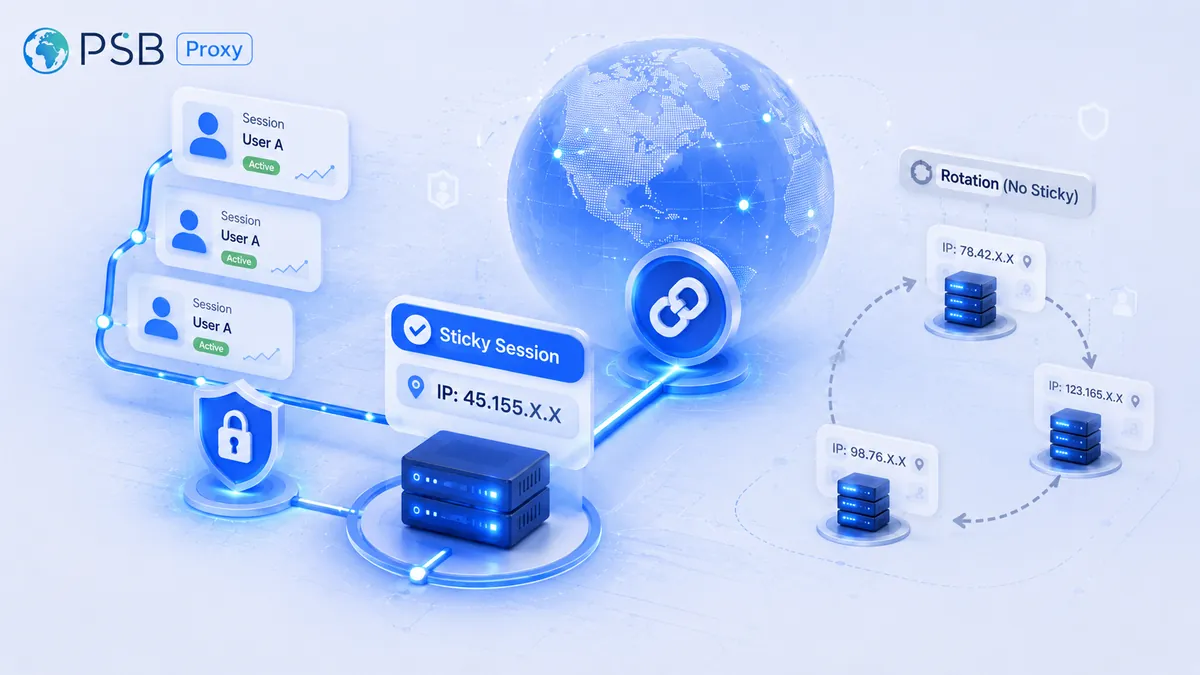
- IP rotation. Automatic by timer, manual via the Change IP button, via API, or on session end. Typical intervals range from 1 to 30 minutes; sticky sessions are available.
- Sticky sessions. IP is retained for the duration of your session to complete logins, payments, or a series of checks without address changes.
- Automation API. Manage ports, rotate IPs, retrieve status, and integrate with test pipelines and crawlers. Access tokens are generated in the profile.
- Authentication. Login/password or trusted IP whitelists. Team access via sub-accounts is supported.
- Statistics and monitoring. The dashboard shows port status, time to rotation, session logs, and basic analytics.
- Tool compatibility. Works with browser profiles, Selenium, Playwright, curl, OS-level proxies, proxy managers, and testing environments.
Practical advantages
- Closeness to real mobile traffic. Less data noise and fewer artificial blocks.
- Stability control. Sticky sessions plus predictable rotation simplify long workflows.
- Scalability. Multiple ports, parallel flows, API automation—convenient for marketing, analytics, and QA teams.
- Flexible geography. Accurate country and sometimes city selection improves local testing and research quality.
Important: use proxies ethically, comply with platform rules, laws, and service terms. MobileProxy.Space is intended for legitimate use cases such as testing, analytics, ad monitoring, and service quality assurance.
Use case 1. SMM and mobile advertising: local validation and scaling without false bans
Who it’s for: performance marketers, SMM specialists, media buyers, agencies.
Purpose: verify ad impressions and clickability in target regions, validate landing pages across geos, manage multiple projects without risk overlap, speed up moderation, and test UTM parameters.
How to use
- In the dashboard, select the target country and, if needed, a specific region and carrier. Create a port with a 10–20 minute sticky session.
- In a browser profile, set the provided proxy host and port, username, and password. Use one profile per session to avoid cookie mixing.
- Open the ad platform and landing page. Check campaign geo settings, currency localization, and payment availability. Preview ads.
- Run an A/B test: creative A with a local offer and currency, creative B with a universal one. Measure clicks and conversions.
- Switch to another region via the Change IP button or API and repeat validation.
Example outcome
An agency validated offer localization across three regions. After switching to mobile IPs for testing and previews, mobile feed CTR in the first region increased from 1.2% to 1.6%, while CPC dropped by 14% thanks to more relevant messaging and correct local pricing. Invalid clicks decreased by 9%: testing creatives under real mobile network conditions revealed incorrect redirects in two cities, which were fixed before the main campaign launch.
Tips and best practices
- One region—one port. Sessions stay isolated; cookies don’t mix.
- Use sticky sessions for critical actions: logins, moderation, payment tests.
- Respect IP rotation frequency. Avoid abrupt changes mid-checkout to prevent anti-fraud triggers.
- Document hypotheses: region, creative, offer, currency, UTM, metrics. Change one factor at a time.
Common mistakes
- Overly short rotation intervals leading to session breaks and extra CAPTCHAs.
- Using one proxy port for multiple team tasks, causing cookie and log interference.
- Mixing mobile tests with data-center fallback proxies, which skews results.
Use case 2. Market research and price monitoring: fair mobile SERPs across cities
Who it’s for: analysts, category managers, e-commerce owners, BI teams.
Purpose: compare prices and assortments, verify SKU availability, track promos and retail stock, and validate mobile listings on marketplaces and stores.
How to use
- Prepare a list of pages to check: SKU cards, categories, promo pages. Group by city.
- Create a pool of MobileProxy.Space ports for target cities or regions. Enable 10–15 minute rotation to smooth session limits.
- Configure your crawler to use proxies by city. Limit request rates and comply with platform rules.
- Collect price, availability, delivery, and promo labels. Store timestamps and city.
- Analyze differences: average price by city, out-of-stock share, promo response speed.
Example outcome
An e-commerce team monitored 220 SKUs across 12 cities. Switching to mobile proxies increased successfully collected cards from 62% to 94% without additional retries—mobile SERPs didn’t throttle traffic like data-center IPs. Three SKUs showed regional price differences of up to 7.8%. Timely price adjustments in two cities increased purchase conversion by 11.5% a week later.
Tips and best practices
- Add pauses and random delays to avoid traffic spikes.
- Don’t reuse the same port continuously for days. Rotate ports on a schedule to mimic natural session flows.
- Log IP, city, carrier, and request time to explain BI anomalies.
Common mistakes
- No city-level separation, masking local promos with aggregated prices.
- Ignoring session timeouts—long loads may break with 30-minute rotations.
- Mixing mobile and desktop sources in one report without labeling.
Use case 3. Ad verification and brand safety: controlling placements in real mobile conditions
Who it’s for: brand teams, in-house media, agencies, verification vendors.
Purpose: ensure ads are actually shown to target audiences on mobile networks and render correctly in feeds and apps.
How to use
- Create a separate port per channel. Lock city-level geo (if available) to fix local reach.
- Enable a 15-minute sticky session. Schedule hourly verification passes with IP rotation.
- Collect screenshots and DOM snapshots. Record impressions, visibility, and loaded resources.
- Match results with DSP logs and counters. Look for time and geo mismatches.
- Generate reports on valid impressions, discrepancies, and loading failures.
Example outcome
A brand verified mobile banners in eight cities. Using MobileProxy.Space reduced discrepancies between DSP reports and actual visibility from 12% to 4%. In one region, creatives failed to load over Wi-Fi but worked fine on mobile networks. Reallocating 30% of the budget to higher-visibility inventory increased viewable impressions by 18% within a week.
Tips and best practices
- Capture the carrier ASN alongside screenshots—it quickly explains inventory targeted only to mobile networks.
- Watch time-to-rotation. Don’t start long checks right before an IP change.
- Test creatives under varied network conditions: 4G, throttled speed, higher latency—to catch heavy asset issues.
Common mistakes
- Verifying from data-center IPs, which risks filtering and distortion.
- One screenshot per channel—continuous checks across time and geos are required.
- No reconciliation log with campaign data.
Use case 4. Mobile app and payment testing: QA without costly field tests
Who it’s for: QA teams, product managers, developers, support.
Purpose: reproduce geo- and carrier-dependent bugs, verify payment availability, phone verification, localization, and delivery tariffs.
How to use
- Configure a test device or emulator with MobileProxy.Space as a system proxy. Enable a 20–30 minute sticky session for payment flows.
- Launch the app and complete signup, login, and profile setup. Check local permissions and formats.
- Open the payment screen, verify available methods and currency. Complete a minimal sandbox or test-merchant transaction.
- Switch geo via Change IP and repeat. Compare screens and methods.
- Compile reports: step, screenshot, IP and carrier, timestamp, result.
Example outcome
A fintech team reproduced a new payment-method bug affecting only mobile users of a specific carrier in one region. With MobileProxy.Space, they replicated the issue in 40 minutes, matched it with logs, and fixed region validation in the backend. Support tickets for the issue dropped by 82% within a week after release.
Tips and best practices
- Use the longest possible sticky sessions for payments—rotation during 3DS triggers re-authentication.
- Test critical paths across at least two carriers per region; CDN sets and speeds often differ.
- Maintain a baseline set of screenshots by region to speed up regression.
Common mistakes
- Configuring proxies only in the app, not system services—some requests bypass the proxy.
- No carrier/ASN logging, making later reproduction difficult.
- Session interruption mid-transaction due to aggressive rotation.
Use case 5. Mobile SEO visibility and snippets: local SERP validation
Who it’s for: SEO specialists, content marketers, site and aggregator owners.
Purpose: check mobile rankings and snippets by region, assess local elements’ impact, validate language versions and structured data.
How to use
- Define priority keyword clusters and target cities.
- Create a separate MobileProxy.Space port per city. Enable gentle 10–15 minute rotation to bypass limits.
- Run checks via lightweight browser profiles with a mobile user agent. Capture URL, rank, snippet type.
- Compare with webmaster tool reports. Flag mobile discrepancies.
- Implement actions: localize titles, improve structured data, optimize LCP elements.
Example outcome
A content delivery service checked 180 queries across nine cities. Mobile SERPs differed from desktop for 46% of queries, with local packs pushing organic results below the first screen. After adding structured data and local headers, mobile snippet CTR increased by 13% in regions with high mobile traffic share.
Tips and best practices
- Use the same lightweight browser profile and disable extensions to reduce noise.
- Capture above-the-fold screenshots—mobile visibility is critical.
- Stagger checks over time to avoid temporary SERP fluctuations.
Common mistakes
- Mixing mobile and desktop SERPs in one dashboard.
- Overly aggressive parsing leading to temporary blocks and CAPTCHAs.
- Ignoring local hints and POIs that affect CTR.
Use case 6. Anti-fraud analytics and rule stress-testing: resilience without reputation damage
Who it’s for: risk analysts, security specialists, product teams.
Purpose: validate anti-fraud triggers for mobile networks, identify false positives, and fine-tune thresholds and geolocation signals.
How to use
- Define test scenarios: login, password reset, card addition, rapid action repetition.
- Select 3–4 cities and different carriers in MobileProxy.Space. Create ports with varying rotation frequencies.
- Run test scripts capturing timing, response codes, and triggered rules. Store IP and ASN.
- Analyze risk score distributions. Build a dashboard: carrier, city, scenario, risk score.
- Coordinate threshold and exception changes with security.
Example outcome
A media service found elevated false positives in one region when adding cards from a specific carrier’s mobile network. Adjusting the scoring model to account for mobile ASN reduced rejected legitimate attempts by 24% and increased funnel retention by six points.
Tips and best practices
- Run tests only on test accounts and sandboxes. Never load production without approval.
- Reproduce natural user pauses instead of firing request bursts.
- Log TLS and network fingerprints to isolate client-side effects.
Common mistakes
- Treating mobile NAT as compromised IPs, causing unnecessary blocks.
- Using overly broad whitelists instead of signature-based rules.
- No post-change validation after threshold updates.
Use case 7. Cross-border support and content localization: the service looks as intended
Who it’s for: support teams, localization teams, content managers.
Purpose: verify localized pages and pricing, reproduce user tickets by region, and validate geo-blocks and age gates.
How to use
- Compile common regional tickets: unavailable pages, wrong currency, incorrect age screen.
- Create a MobileProxy.Space port per region. Enable up to 15-minute sticky sessions to follow the user journey.
- Walk through the scenario alongside the user, matching steps and timing.
- Collect evidence: IP, carrier, screenshots, steps, timestamps.
- Submit a bug report and re-test after release.
Example outcome
A video service’s content team closed 41 tickets in a month using mobile proxies. Four regions had currency and tax mismatches on the final checkout screen. Fixing the issue reduced tickets by 37% and increased NPS by 0.6 points in those regions.
Tips and best practices
- Live support with proxies builds trust—you see exactly what the user sees.
- Store reference scenarios and baseline screenshots in a knowledge base.
- Use manual rotation during investigations to keep conditions stable.
Common mistakes
- Changing geo mid-conversation with a user.
- Failing to log carrier and city, complicating reproduction.
- Using the same browser profile for different countries.
Step-by-step integration: from first port to automation
Quick start
- Create a port in the dashboard: set country, preferably carrier, and rotation interval. Enable sticky sessions if needed.
- Copy connection parameters: host, port, credentials—or whitelist your IP.
- Configure your app or browser at the system or tool level.
- Test connectivity on a lightweight page, then run your scenario.
- Record baseline metrics: load speed, CAPTCHAs, session behavior during rotation.
Automation
- Connect the MobileProxy.Space API to rotate IPs on test completion.
- Use environment variables for host and port to switch regions in pipelines.
- Add warm-up steps—brief navigation before main tasks reduces cold anomalies.
Reliability and scaling
- Use multiple ports per region for load scenarios and monitoring.
- Separate tasks by ports: marketing, QA, support—each with its own rotation grid.
- Collect telemetry: response times, failures, IP changes—to optimize rotation intervals.
Technical details and nuances in 2026
- Fingerprinting and behavioral signals. Platforms analyze more than IPs. Maintain stable user agents, rendering quality, and timings. Mobile IPs don’t replace proper client configuration.
- JA3 and TLS profiles. Different clients leave different TLS fingerprints. Use consistent client versions and avoid mixing drivers.
- HTTP/2 and prioritization. Mobile networks have higher latency. Account for multiplexing and resource prioritization.
- Geolocation and carriers. Services may rely on IP and browser signals. Disable GPS when it affects behavior.
- Session stagnation. Refresh tokens in long sticky sessions; abrupt IP changes during refresh can cause logouts.
Comparison with alternatives: why mobile proxies and MobileProxy.Space
Mobile vs data-center proxies
- Representativeness. Mobile IPs resemble natural traffic; data-center IPs are more often flagged as automated.
- Session stability. Sticky sessions and controlled rotation safely cover critical steps.
- Geo accuracy. Mobile proxies better reproduce local SERPs and ads.
Mobile vs residential proxies
- Availability and pool cleanliness. Mobile ASNs intersect less with mass pools, reducing reputation contamination.
- NAT architecture. Beneficial for some tasks—behavior closer to typical mobile users.
Why MobileProxy.Space
- Flexible rotation and sticky sessions. Transparent IP lifetime control and manual switching.
- Geography and carriers. Precise location selection and carrier binding for complex cases.
- Automation-ready API. Port management, IP rotation, pipeline integrations.
- Convenient dashboard and stats. Port states, rotation logic, session logs.
FAQ: quick answers to common questions
1. What does a mobile IP offer versus a data-center IP?
It belongs to a carrier network and looks like real user traffic, reducing artificial filters and providing representative testing results.
2. How does IP rotation work?
By timer, manually, or via API. Enable sticky sessions for long procedures; use 10–15 minute rotation for mass monitoring.
3. Are HTTP and SOCKS5 supported?
Yes. HTTP is often enough for browsers; SOCKS5 is convenient for programmatic clients.
4. Can I lock an IP for login and payments?
Yes—use sticky sessions during critical steps, then return to rotation.
5. How do I grant team access?
Create sub-accounts or use trusted IP authentication. Separate ports by roles to keep logs clean.
6. What if I see CAPTCHAs?
Reduce request frequency, extend sticky sessions for critical steps, stabilize the client, and avoid mid-form IP switches.
7. Can IP rotation be automated?
Yes, via API—trigger on test completion or errors, and monitor with queues and metrics.
8. How do I choose a rotation interval?
Interfaces and payments: longer (15–30 minutes). Price monitoring: shorter (10–15 minutes) with pauses. Test and document impact.
9. What about legal considerations?
Use within laws and platform rules. Work only with your systems or with explicit permission; respect data and privacy terms.
10. How do I avoid session overlap?
One browser profile per port, clear task separation, and scheduled rotation. Don’t run multiple profiles on one port simultaneously.
Conclusions: who MobileProxy.Space is for and how to start
If you need to faithfully reproduce mobile user experience, MobileProxy.Space covers critical tasks: ad and creative validation, price and SKU monitoring, impression verification, app and payment testing, local mobile SEO visibility, anti-fraud analysis, and support workflows. Controlled rotation and sticky sessions deliver stability, while the API enables automation. Proper port and session discipline prevents overlap and accelerates experimentation.
How to get started now
- Create 2–3 ports for priority regions. Set a 10–15 minute rotation interval.
- Connect browser profiles and test environments. Run baseline speed and auth checks.
- Document scenarios and checklists. Enable sticky sessions for critical steps.
- Collect initial metrics and adjust rotation intervals and request frequency.
- Integrate the API and scale across marketing, QA, and support. Log IP, geo, carrier, and timestamps in reports.
Bottom line: MobileProxy.Space is a practical 2026-ready tool for teams that need an accurate mobile user perspective. Configure ports, discipline sessions, automate routine work—and make decisions based on data, not assumptions.