

 Русский


 October 21, 2026
Most of the time a proxy "stops working" because of something small: a stray space in the login, the wrong protocol, or an IP address that is missing from the whitelist. Below is a two-minute check, then ten causes with a fix for each, from the most common to the rarer ones. If you need the basics first, start with our guide on how to set up a proxy on a computer and a phone.
A two-minute check
Before you dig into your app settings, test the proxy on its own. Open a terminal and run one command with the details from your dashboard:
curl -x http://LOGIN:PASSWORD@HOST:PORT https://ipinfo.io/json
If the answer shows the proxy IP and country, the proxy is alive and the problem sits in your app, your browser or one specific site. If you get an error, its text usually tells you where to look:
|
What curl printed |
What it means |
Where to look |
|
CONNECT tunnel failed, response 407 |
The proxy rejected the login and password, or does not recognize your IP |
Causes 1 and 2 |
|
CONNECT tunnel failed, response 403 |
The proxy refused the connection |
IP whitelist, port, plan expiry |
|
Failed to connect … Couldn't connect to server |
The host and port cannot be reached |
A typo in the host or port, a network block |
|
Connection timed out |
The connection hangs |
A closed port, the wrong protocol, a firewall |
Four questions narrow the search quickly:
-
Does the proxy answer in curl? If yes, it works, and the problem is further along the chain.
-
Does it work in another program? If yes, the settings of the original program are at fault.
-
Does it work from another network? If yes, your network, firewall or provider is in the way.
-
Does the error appear on every site or on one? If on one, the site restricts access (see cause 5).
Two more steps help. Open the same site from another device and from another network, for example mobile data, to see whether your own network is to blame. And copy the proxy details from the dashboard again instead of typing them by hand. For speed and anonymity checks, see our article on how to test a proxy.
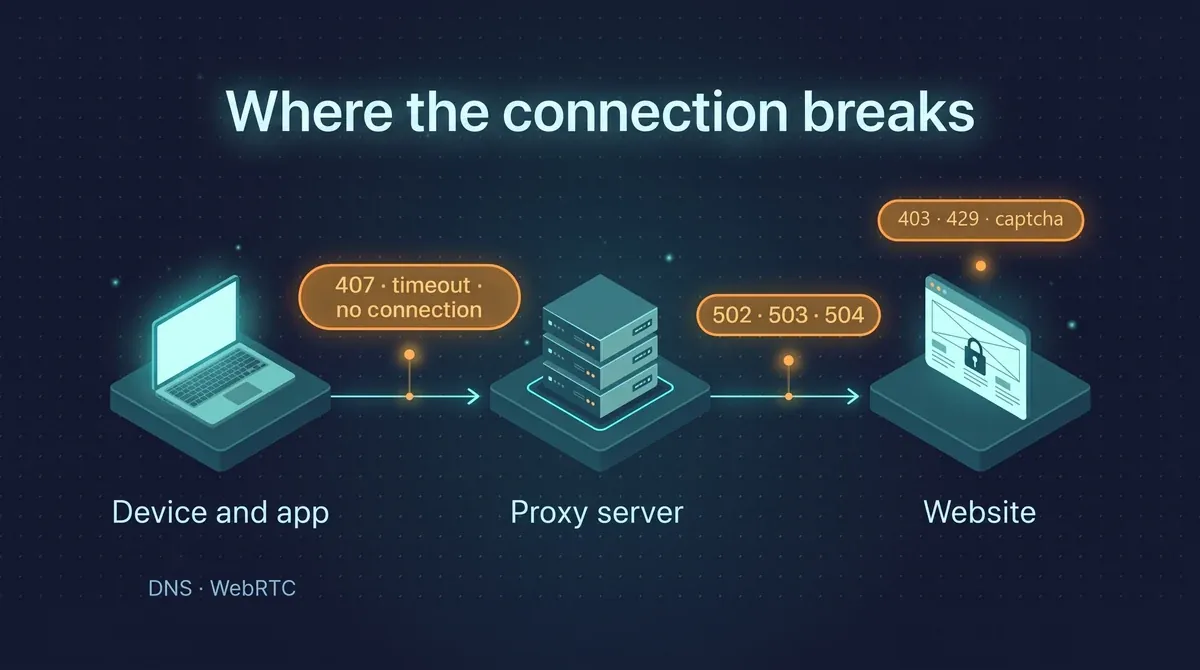
A connection passes three steps. An error at each one looks different, so the response code tells you more than guesswork.
Wrong login or password, or your IP is not whitelisted (causes 1 and 2)
1. Login and password
This is the most common cause. The proxy answers with 407 Proxy Authentication Required when authorization fails. Check three things:
-
the details were copied without a space at the start or the end. Password managers and chat apps like to add one when you copy;
-
after you change the password in the dashboard, the old connection strings stop working. Update them in every program;
-
if the password contains @ : / #, encode those characters in a connection string for curl or Python: @ becomes %40, : becomes %3A, / becomes %2F. Otherwise the program reads part of the password as the address.
2. Your IP is not whitelisted
If access is set up through a whitelist, the proxy accepts only the addresses on the list and does not ask for a login and password. You then need only HOST:PORT, but from the exact IP you added. This is where people get confused: a home computer, a server and a phone on mobile data all have different addresses, and many providers change them from time to time. The IP whitelist guide shows how to add an address. If your address keeps changing, it is simpler to switch to login and password access.
Protocol, port and string format (causes 3 and 4)
3. The wrong protocol
Each port speaks one protocol: HTTP(S) or SOCKS5. The program expects SOCKS5 and you entered an HTTP port, or the other way round. From the outside it looks like "the connection resets" or an endless loading screen: talking to an HTTP port as if it were SOCKS5 usually ends in a timeout, not a clear error. Check in your dashboard which protocol belongs to that port and set the same one in the program.
In curl and Python, SOCKS5 is written as socks5h://. The h matters: with it, DNS queries also go through the proxy instead of your provider. With a plain socks5://, the site name is resolved on your side first.
curl -x socks5h://LOGIN:PASSWORD@HOST:PORT https://ipinfo.io/json
One more trap: the Windows system proxy settings handle HTTP(S) proxies, but SOCKS5 with a login and password does not work there without extra software.
4. The wrong port or string format
Different programs want the same details written in different ways. One account looks like this:
|
Format |
Where you meet it |
|
HOST:PORT:LOGIN:PASSWORD |
Antidetect browsers, many scrapers |
|
LOGIN:PASSWORD@HOST:PORT |
Some extensions and bots |
|
http://LOGIN:PASSWORD@HOST:PORT |
curl, Python, Node.js |
|
HOST, PORT, LOGIN, PASSWORD in separate fields |
System settings, browsers, apps |
A host and port swapped, a missing colon, or http:// instead of socks5:// all give the same picture: "it does not work", even though the proxy is fine.
Why "anonymous" proxies stop working on a site (cause 5)
It happens like this: the proxy connects, the IP in the check has changed, but one particular site answers 403, shows a captcha or talks about "suspicious activity". That is not a broken proxy. The site restricts access: its bot protection does not trust the address, or it sees requests that are too frequent.
The word "anonymous" is misleading here. It means the proxy does not pass on your real IP, not that the address is "clean". IPs from data centers have visible traits, and their ranges have long been known to websites. If hundreds of people use the same address, as with free lists, it quickly ends up restricted.
How to tell a site restriction from a broken proxy: open a neutral site through the same proxy. If it loads while the one you need answers 403 or a captcha, the proxy works and the question is how much that site trusts the address. If nothing opens, go back to causes 1 to 4.
What you can do:
-
pause between requests and do not run dozens of parallel threads on one IP. Start small and raise the load until you see a 429;
-
send normal browser headers: User-Agent and Accept-Language;
-
for sites with strong protection, use residential proxies or mobile ones. Their addresses belong to home providers and mobile operators, and sites treat them more calmly.
Note: if a site restricts access on principle, for example under its terms of use, a proxy does not change that and should not.
The proxy does not work in a browser or an app (cause 6)
A common picture: the proxy is set in Windows, but the program still connects directly and the IP does not change. Many apps do not read the system settings. They either have their own "Proxy" section or none at all. A browser can also use its own settings or an extension that overrides the system ones.
-
Check where exactly the proxy is set: in the system, in the browser, in an extension or in the program itself. If it is set in several places at once, they conflict.
-
If a program has no proxy settings of its own, route its traffic through Proxifier or a similar tool: it intercepts the connections of the chosen application and sends them through the proxy.
-
For scripts in Python and Node.js, set the proxy in the code or in environment variables, because they do not take the system settings.
-
In Windows the system settings live under Settings → Network & Internet → Proxy. If a manual proxy with old details is switched on there, programs that read it will keep going through it and break after a password change.
Another common case: the proxy works in a browser but not in a program. A browser can show a sign-in window by itself, while a program without login and password support simply gets a 407 and gives up. An IP whitelist solves this.
For step-by-step instructions for Windows, macOS, Android and iPhone, see the guide on how to use a proxy on a computer and a phone.
DNS, WebRTC and time zone leaks (cause 7)
The proxy can work while a site still "sees" your real city. There are usually three reasons:
-
DNS. Name lookups go through your provider instead of the proxy. For SOCKS5 use the socks5h:// scheme, and in programs turn on the "DNS through proxy" option.
-
WebRTC. A browser can reveal your real IP directly, bypassing the proxy. Turn WebRTC off in the browser settings or with an extension, or work in an antidetect browser where it is set per profile.
-
Time zone and language. A German proxy with a system time zone from Chicago looks odd to a site and to its protection. Match the time and language to the country you chose.
You can check all of this on any leak test service: it shows the IP, country, DNS servers and the address WebRTC returns. All three should belong to the proxy country.
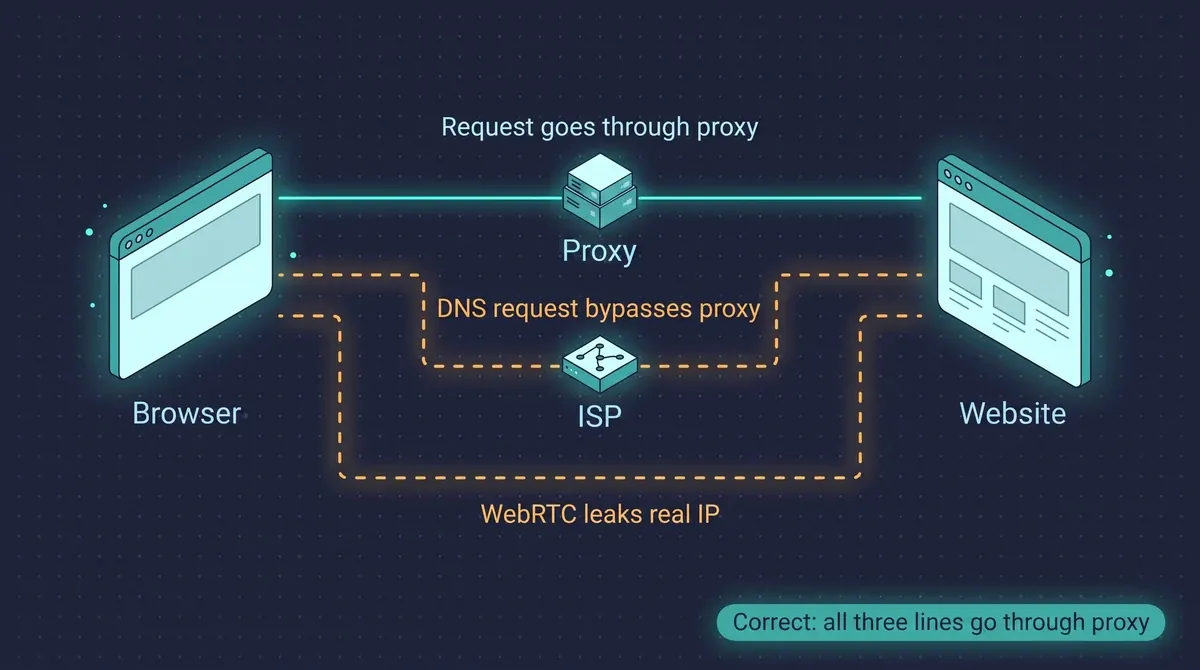
If DNS and WebRTC go around the proxy, the site sees both the proxy IP and your real address.
Slow connection: distance, rotation, overloaded pool (cause 8)
-
Too far. If the site is in the US and the proxy is in Indonesia, every request takes a detour. Choose a country closer to the site, and for data collection raise the timeout too.
-
A new IP on every request. With rotation the connection opens again each time, which adds delay. For "log in and do a few things" scenarios a sticky session works better: the address stays for a set time.
-
Too many threads on one proxy. The channel is shared by all threads. Lower their number or add more proxies.
-
Mobile IPs. The speed of a mobile proxy depends on the operator network. For bulk collection from simple sites, datacenter or residential proxies fit better.
Two causes people often miss (9 and 10)
9. Traffic or the plan has run out
If everything worked before and suddenly stopped on all sites at once, look at the dashboard: the remaining traffic and the plan expiry date. At a zero balance or after the plan ends, connections stop going through.
10. An antivirus, firewall or work network is in the way
Corporate networks and some antivirus tools do not let connections out to non-standard ports. Test the proxy from another network, for example by tethering to your phone. If it works there, ask the administrator to open the port or pick another port in the dashboard. Also make sure a second proxy or VPN is not switched on: two traffic interceptors usually interfere with each other.
Error code cheat sheet
|
Error |
What it means |
What to do |
|
407 |
Proxy authorization failed |
Check the login, password and IP whitelist |
|
403 |
The proxy or the site denied access |
Check the whitelist; if the site answers, lower the request rate or change the proxy type |
|
429 |
Too many requests from one address |
Add pauses, lower the thread count, change the IP |
|
502 / 503 |
The gateway got no proper answer from the site, or is temporarily unavailable |
Repeat the request, change the IP or country |
|
504 and timeouts |
The answer took too long |
Choose a closer location, raise the timeout |
|
ERR_PROXY_CONNECTION_FAILED |
The browser could not reach the proxy |
Check the host, port, protocol and network |
|
ERR_TUNNEL_CONNECTION_FAILED |
The proxy did not open a tunnel to the site |
Most often authorization or the whitelist |
|
SSL error |
A certificate problem or a wrong system clock |
Check the date and time; do not turn off SSL checks |
When to switch the proxy type
Sometimes nothing is broken: the proxy type just does not fit the task. A rough guide:
|
Situation |
What to take |
|
Data collection from simple sites, high speed |
Datacenter: faster and cheaper |
|
The site answers 403 and a captcha to datacenter IPs |
Residential |
|
Social networks and ad accounts |
Mobile 4G/5G |
|
You need the same IP for weeks |
Static ISP |
To read more about how residential proxies differ from mobile and datacenter ones, see the separate article.
FAQ
Why does the proxy connect but sites do not open?
Most often the protocol does not match (HTTP instead of SOCKS5 or the other way round) or DNS goes around the proxy. Test the proxy with the curl command from the start of the article: if the IP answers, the problem is in the program or on the site.
What should I do if a site detects my proxy?
Check DNS and WebRTC leaks, match the time zone and language to the proxy country, and lower the request rate. If the site still restricts access, try residential or mobile IPs.
How do I check that my proxy works?
Run curl -x http://LOGIN:PASSWORD@HOST:PORT https://ipinfo.io/json with your details. The answer should show the proxy IP and country, not yours.
Why do free proxies stop working?
Hundreds of people use the same addresses at once, and sites quickly remember such IPs and restrict them. Regular work needs your own addresses and support that can help you sort out an error.
About PSB Proxy
PSBProxy offers infrastructure for businesses, developers, and automation. Residential and mobile proxies start at $0.60/GB, while static proxies start at $1. Access over 90 million IP addresses across 195 countries, with support for HTTP(S) and SOCKS5, geolocation selection, and IP rotation and sticky sessions. A pay-as-you-go model allows you to pay only for the traffic you use. A free trial is available. Web Scraping, Google Search, and YouTube APIs are available for data collection and extraction.